
AI Ads for Ecommerce: Conversion Playbook
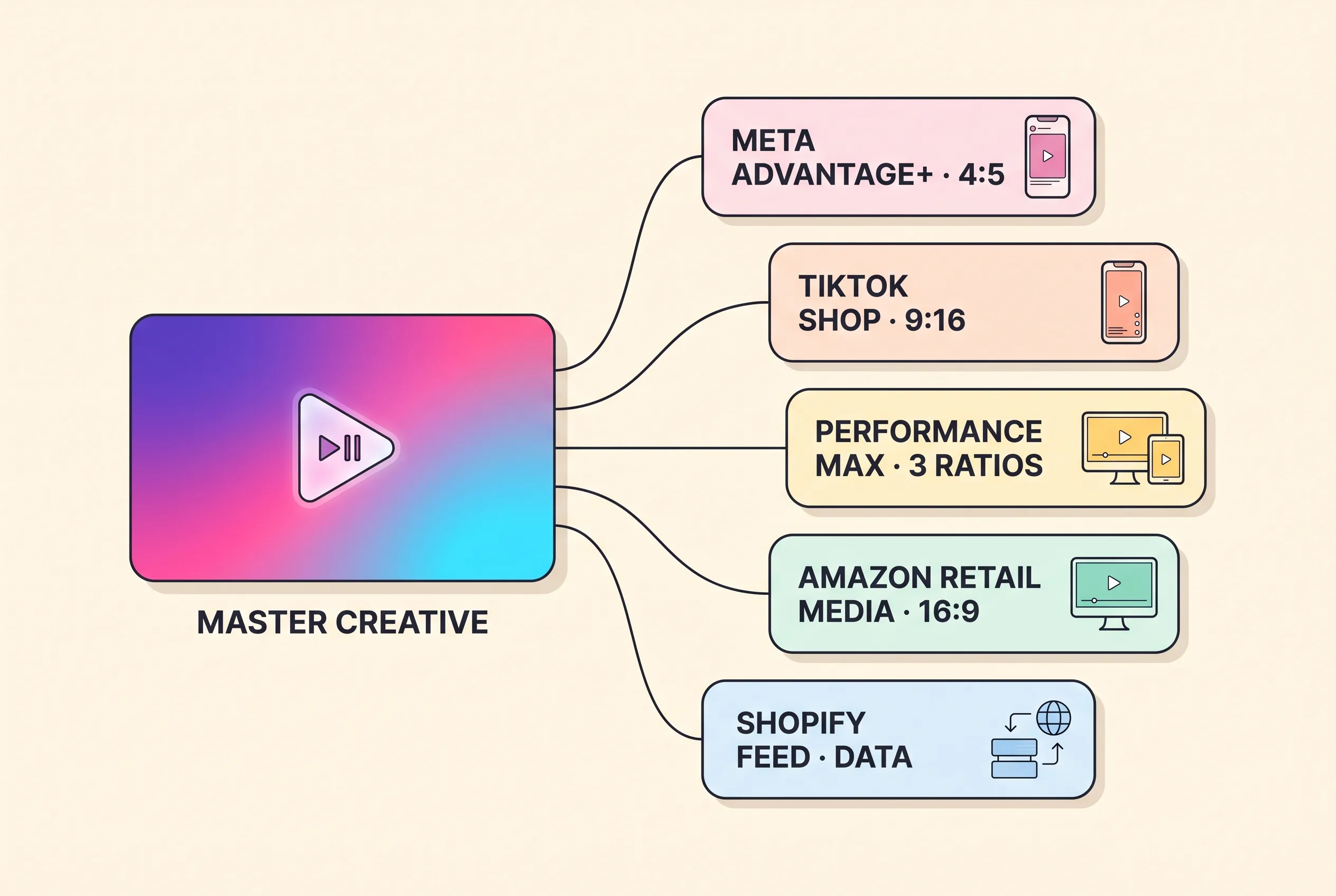
AI ads for ecommerce are product ads whose creative is generated rather than filmed, then conformed to each commerce surface’s spec. Five surfaces matter: Meta Advantage+, TikTok Shop, Google Performance Max, Amazon retail media, and Shopify as the catalog source. Each demands a different aspect ratio, duration, safe zone and feed dependency — one master, five conforms.
This is not another ranking of AI ad tools. It is the surface map underneath one: what each commerce placement enforces, what converts there, and what a generation pipeline can and cannot produce for it. Tools are handled elsewhere, in the tool question, scored on six published criteria. For the format underneath, start at the complete guide to AI video ads and the seven formats.
Every spec below was read off the platform’s own documentation on 21 August 2026 and is cited. Where a platform publishes no figure, this page says “not published as of 2026-08-21” instead of estimating. Two live Amazon pages disagree with each other on the aspect ratio and the optimal length; both readings are printed rather than averaged.
Table of Contents
- AI ads for ecommerce is a surface problem, not a tool problem
- The surface × creative-spec matrix
- The five ecommerce ad surfaces, ranked by AI leverage
- On catalog-driven surfaces, the feed is the creative
- How to conform one ecommerce master to every surface it runs on
- What an AI pipeline cannot make for any commerce surface
- Safe zones, first frames, and caption burn-in
- What this costs, in one paragraph
- Frequently asked questions
- Pick the surface first, then build the ad
AI ads for ecommerce is a surface problem, not a tool problem
The choice that decides whether an ecommerce ad converts is which surface it renders on, not which generator produced it. A 9:16 presenter cut that works on TikTok Shop is the wrong file for Amazon Sponsored Products, where audio is removed and talking-head video is discouraged by name. Same asset, same model, opposite outcome. The surface sets the spec; the generator only fills it.
That matters most to DTC brands, because a DTC brand does not buy one placement. It buys Meta and TikTok, adds Google once the catalog is worth shopping, and adds Amazon retail media once the ASINs are live — all from one creative budget. The unit of work is therefore a master plus N conforms, not N separate shoots.
The published coverage of this topic organises itself three ways: by tool, by ad platform, or by abstraction — bidding, budget, targeting. None of the three organises by the place the ad actually renders, which is the layer that enforces a ratio, a duration and a caption rule. That is the gap this page fills.
What a surface means on this page
A surface is a placement with three things of its own: a creative spec, an interface overlay, and a product-data dependency. All three have to be satisfied before the ad is allowed to render, and each is set by the placement rather than by the platform that sells it.
That last clause is the useful part. Two placements on the same ad platform can be two surfaces: Amazon Sponsored Brands video carries audio, and Amazon Sponsored Products video has audio removed. Counting by platform undercounts the work. Counting by surface gives you the number of conforms you actually owe.
The surface × creative-spec matrix
Three of the columns below exist nowhere else in the category: interface-overlay hazard, product-data dependency, and the split between what an AI pipeline can produce and what it cannot. Every cell was read off the platform’s own documentation on 2026-08-21, and where a platform publishes nothing the cell says so.
A shorter social-placement table already lives on our AI product ad generator that locks the same SKU in every variant page; this one adds four surfaces and three columns it does not carry.
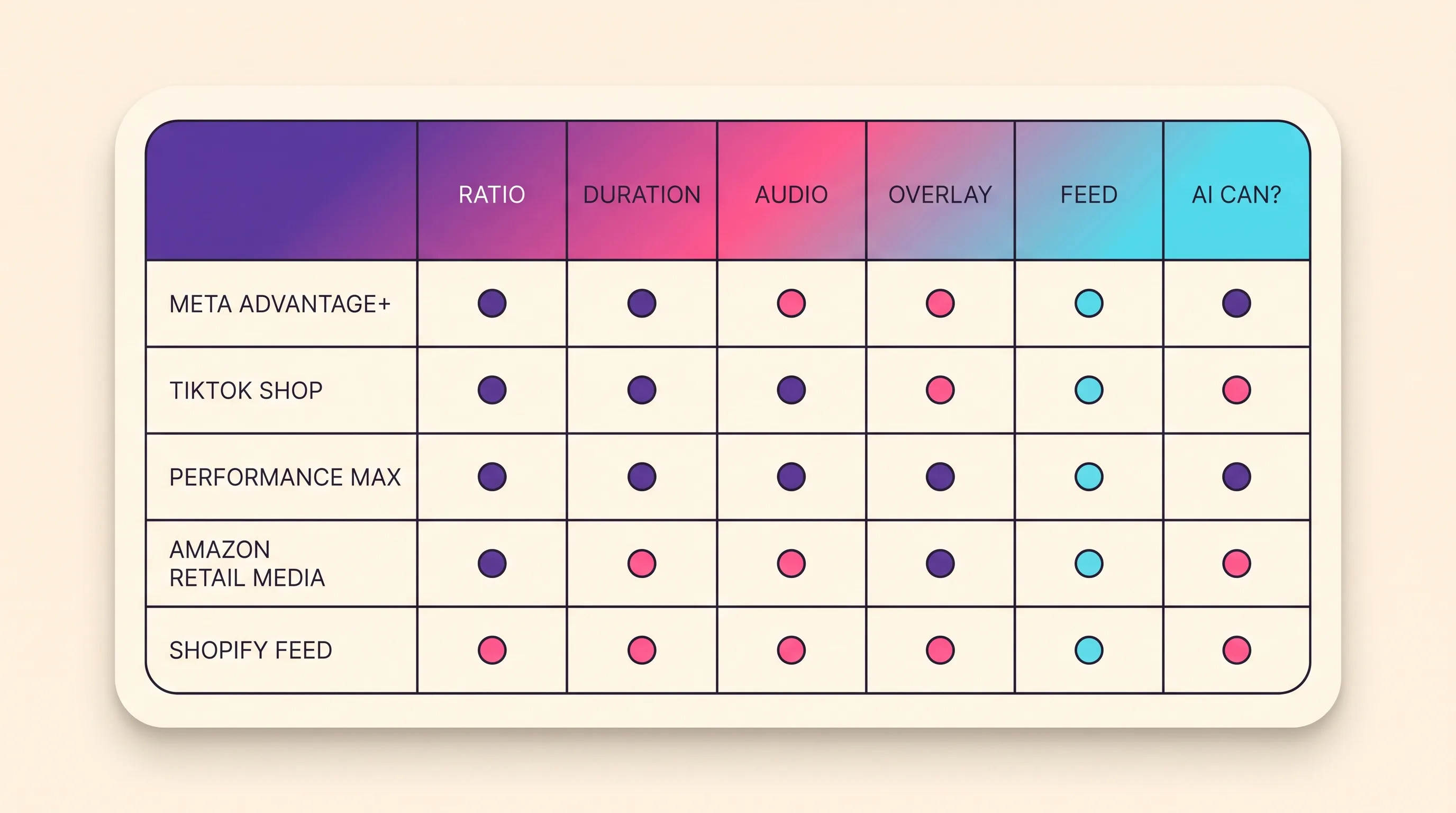
| Surface | Ratio(s) the placement takes | Duration window | Audio rule | Interface-overlay hazard | Product-data dependency | What AI can produce | What AI cannot produce | Source (checked 2026-08-21) |
|---|---|---|---|---|---|---|---|---|
| Meta Advantage+ and catalog placements | Facebook Feed video 4:5, 1,440 × 1,800 px; Collection 1.91:1 to 1:1, 1,080 × 1,080+; adapt_to_placement opt-in by default, 4:5 and 9:16 enabled | Facebook Feed 1 second to 241 minutes; catalog video “no length restrictions” | Captions and sound “Optional, but recommended” | video_auto_crop ships in the standard-enhancements bundle — Meta re-crops unless you opt out | Total. Nine required catalog fields; image_link min 500 × 500 px; 20 videos per product, 200 MB each | Every frame of the ad file, plus 20 video variants per product | The catalog — nine required fields, live prices, working image links | Meta catalog reference; Facebook Feed ads-guide page |
| TikTok Shop video placements | 9:16 recommended, ≥ 540 × 960 px; 16:9 ≥ 960 × 540; 1:1 ≥ 640 × 640. TikTok Shop’s seller video-quality guidance publishes no ratio, resolution or duration spec as of 2026-08-21 — the ads-side spec here is the only published one | Auction in-feed up to 10 minutes; reservation 5–60 s, 9–15 s recommended | Mandatory — “The ad must contain audio” | No fixed pixel margins. Safe zone set by dimension, ad caption length and interactive add-ons; separate templates for In-Feed and In-Feed with Anchor | Video Shopping Ads need no Catalog and no Pixel — data syncs from TikTok Shop; 1–20 products per ad | The vertical presenter cut and the refresh volume — 3–5 creatives per ad group | A compliant LIVE session (AI-generated voices prohibited); any edit altering size, colour, material or shape | In-feed spec; video ad specifications; ad-format policy |
| Google Performance Max asset groups | Images 1.91:1, 1:1, 4:5; video 16:9, 1:1, 9:16 — one of each orientation minimum | Video “10 seconds or more”; 10–60 s for Shorts eligibility | Not published as of 2026-08-21 | You never approve the assembled combination. Supply no video and “one or more videos may be auto-generated” | Merchant Center image contract — ≥ 500 × 500 px, no overlays, watermarks or promotional elements, no generic image that is not the actual product | Images at all three ratios, video at all three orientations, to a ceiling of 15 videos | Provenance metadata — Playcut writes no IPTC DigitalSourceType, which Merchant Center requires on AI-generated images and forbids removing | PMax asset specifications; Merchant Center AI metadata |
| Amazon retail media video placements | Sponsored Brands “16:9 (square pixel) only”, 1280 × 720 / 1920 × 1080 / 3840 × 2160. Conflict: Amazon’s getting-started guide says 9:16 or 16:9. Sponsored Products 16:9, with 9:16 “to be available in 2026” | Sponsored Brands 6–45 s, “20 secs or less highly recommended” (getting-started guide: 15–30 s). Sponsored Products “Seven seconds and longer”, no published maximum | Sponsored Brands “videos always start without audio”; Sponsored Products “No audio. Audio will be removed.” | Mute toggle sits lower right; Amazon says keep text out of it | A live ASIN. Sponsored Brands needs Brand Registry; Sponsored Products takes 1–5 videos per ASIN, product ≥ 50% of frame | The silent, product-forward horizontal cut, up to five per ASIN | The listing the click lands on, the Brand Registry gate, the product’s real appearance | Sponsored Brands ad specs; Sponsored Products video guide |
| Shopify as the catalog source | Not published as of 2026-08-21 — the product-media spec table carries no aspect-ratio line | Not published. The limits are file-based: video ≤ 1 GB, up to 4K at 4,096 × 2,160 px | Not published as of 2026-08-21 | None — not an ad surface; the storefront theme controls presentation | It is the product data. Up to 250 media per product; the first is the featured item | The media hanging off each product record | The record — titles, prices, availability, identifiers, image links | Shopify Help Center product-media docs (403 to crawlers, 2026-08-21); Google’s Merchant Center product data specification |
How to read the three columns nobody else publishes
The three columns that change a media plan are overlay hazard, product-data dependency, and the can/cannot split. Ratio and duration are easy to look up and easy to fix in an export. The other three decide whether the ad is possible at all.
Overlay hazard tells you which pixels are not yours. Every commerce surface renders its own chrome over your frame, so a price or a call to action placed in the wrong band disappears at delivery — and the fix is a re-cut, not a re-upload.
Product-data dependency tells you how much of the outcome your creative controls. On a catalog-driven placement the feed picks the SKU and your video only dresses it.
The can/cannot split tells you where to spend. It decides whether a surface is worth a generation pipeline at all, or whether the real bottleneck is data hygiene.
The five ecommerce ad surfaces, ranked by AI leverage
The ranking below is by AI leverage: the share of the finished ad a generation pipeline can produce on its own, once the surface’s creative spec, eligibility gate and product-data dependency are accounted for. Highest leverage first.
It is not a quality ranking of the surfaces as ad channels, and it says nothing about which converts best for your catalog. A low-leverage surface can still be the best-performing one in your account. Leverage measures how much of the work an AI pipeline removes, not how much revenue the placement returns.
Each surface below carries the same three sub-sections: what it demands, what converts there, and what an AI pipeline can and cannot make for it.
1. Meta Advantage+ and catalog placements — the creative file is the whole ad
Meta sits top of the list because the creative file is the entire ad. No storefront chrome competes for the frame, and no in-console generator produces the base spot for you. Whatever you upload is what renders, multiplied across placements by Meta’s own automation.
What the surface demands
Meta demands a catalog and a creative file that survives an automatic crop. Its Facebook Feed video spec calls for 4:5 at 1,440 × 1,800 px, with duration running from 1 second to 241 minutes and captions and sound listed as “Optional, but recommended”. Collection ads take 1.91:1 to 1:1 at 1,080 × 1,080 or larger.
The catalog side carries the harder requirements. Meta’s catalog reference lists nine required fields — id, title, description, availability, condition, price, link, image_link and brand — with image_link at a minimum of 500 × 500 px. Each product can hold up to 20 videos at 200 MB each, and Meta states there are no length restrictions on them.
Two defaults decide what your file looks like at delivery. Allow product video is on by default, so catalog ads serve video from the catalog instead of product images unless media_type_automation is set to OPT_OUT. adapt_to_placement is opt-in by default with 4:5 and 9:16 enabled, and video_auto_crop ships inside the standard-enhancements bundle. The placement-level cut list lives on our Meta-spec 4:5 feed and 9:16 Reels cuts with safe zones page.
What converts there
Volume converts here, because the auction tests combinations rather than hero ads. The catalog’s 20-video-per-product ceiling is the shape of that: it is an invitation to supply variants, not one polished spot. Meta’s guidance recommends a minimum of 20 products in a catalog while stating there are no required minimums.
Meta publishes no separate fee for Advantage+ beyond ad spend, and it is genuinely good at its job — background generation, video expansion, text variants and translations applied to creative you already have. What it does not do is produce the base ad, or give you a face that is yours.
What an AI pipeline can make, and what it can’t
An AI pipeline can make every frame that ships here, and then make nineteen more. This is the surface where generation replaces the most work, because the file is the whole ad and the catalog will hold twenty videos per product. Advantage+ then multiplies what you supplied — complements, not substitutes.
What it cannot make is a 4:5 file straight out of every model. Veo 3.1 renders 16:9 and 9:16 only, so a 4:5 or 1:1 Meta feed video needs a different model or a conform pass from a 9:16 master. Stills are less constrained: 1:1, 4:5, 3:2, 16:9, 9:16 and 21:9 are all available.
It also cannot make the catalog. Nine required fields, live prices and working image links come from your store, and no generator produces them. If the question is which tool builds the file rather than which surface receives it, that belongs to the tool question, scored on six published criteria.
One more thing the pipeline does not control: Meta labels what it detects. Ads created or significantly edited with its generative creative features carry an “AI info” label, and a photorealistic human moves that label next to the Sponsored label rather than behind the three-dot menu.
2. TikTok Shop video placements — where the ad and the storefront share a frame
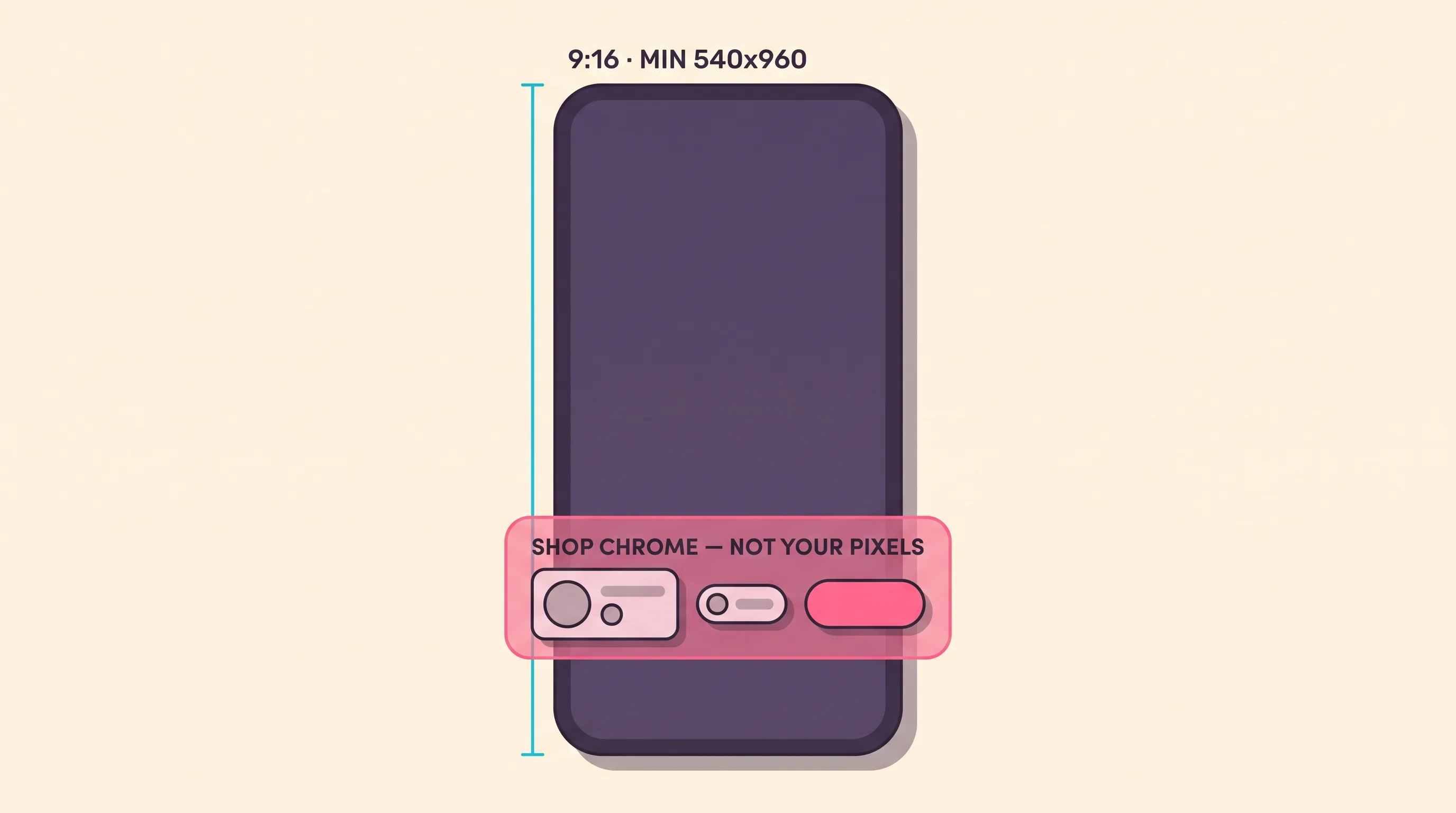
TikTok Shop is the only surface here where the ad and the storefront occupy the same frame. Shop chrome — the product card, the price, the checkout affordance — renders over your video, so the lower third is not yours to design in. Everything else about the surface follows from that.
What the surface demands
The surface demands vertical video with audio. TikTok’s auction in-feed spec recommends 9:16 at 540 × 960 px or larger, with 16:9 at 960 × 540 and 1:1 at 640 × 640 as alternatives. Files run to 500 MB at a bitrate of 516 kbps or higher, and auction in-feed duration goes up to 10 minutes.
The audio rule is not a recommendation. TikTok’s ad-format policy states that “the ad must contain audio and it must not be of poor quality, such as having unclear or muffled sound”, and separately that “static images should not occupy more than 50% of the video”. A silent slideshow fails both clauses.
TikTok also publishes no fixed pixel margins. Its video ad specifications page says the safe zone “is determined by the dimension (vertical, horizontal or square), the ad caption length and any interactive add-on usage”, and ships downloadable templates instead. The ad caption itself takes up to four lines in a white font you cannot customise.
One structural fact reshapes the whole surface. Since July 2025, TikTok’s GMV Max campaign documentation records it as the default and only supported campaign type for TikTok Shop Ads, with LIVE Shopping Ads, Product Shopping Ads and Video Shopping Ads no longer creatable, editable or duplicable against a TikTok Shop destination. With targeting and bids gone as levers, creative supply is the remaining input.
What converts there
TikTok’s own creative guidance is unusually specific and unusually anti-polish. It puts the hook in the first six seconds and the proposition in the first three, caps on-screen text at five to ten words per second, and asks for “a DIY or not overly polished style”. That page was last updated in June 2025.
Cadence matters more than any single spot. TikTok recommends three to five creatives per ad group refreshed ideally once a week, and its Shop video rules ask for at least three seconds of dynamic content and content that features your face and the physical product.
What an AI pipeline can make, and what it can’t
An AI pipeline can make the vertical presenter cut and the weekly refresh volume, which is what this surface consumes. TikTok’s Video Shopping Ads requirements need no Catalog and no Pixel — product data syncs from TikTok Shop and you pick one to twenty products per ad — so the generation job is the video and nothing else.
What it cannot make is a compliant LIVE session or an unlabelled ad. TikTok Shop’s seller policy on AI-generated content, effective 31 July 2026 in the United States, permits AI but requires a label when a video is fully AI-generated or carries synthetic faces, voices or digital humans. It bans AI that alters a product’s size, colour, material or shape, and LIVE prohibits AI-generated voices outright.
On the ads side the obligation is harder still: TikTok Ads Manager states that undisclosed AI-generated content “will be rejected or restricted”. Playcut renders the 9:16 variants; you apply the label and upload them yourself. Our AI UGC ad generator that ships 9:16 variants from one actor covers that workflow.
3. Google Performance Max asset groups — slots the algorithm rotates
An asset group is not an ad, and that inverts what creative approval means. Google documents how Performance Max asset groups work: you supply headlines, descriptions, images, logos and video as slots, and the system assembles combinations you never approve in advance. Review moves from the finished ad to the ingredient list.
What the surface demands
Performance Max wants all three orientations at once, and it publishes exact counts. Headlines run 3–15 at 30 characters max, one of them “15 characters or less”; long headlines 1–5 at 90 characters; descriptions 2–5 at 90 characters. Images come in 1.91:1 at “4+ (Add up to 20)”, 1:1 at “4+ (up to 20)” and 4:5 at “2+ (up to 20)”, plus a 1:1 square logo.
Video takes 16:9, 1:1 and 9:16, each “10 seconds or more”, one of every orientation as the minimum and 15 as the ceiling; vertical needs 10 to 60 seconds for Shorts eligibility. Whether retail Performance Max requires a Merchant Center feed is not published as of 2026-08-21 on any Google page this piece could reach — three of four candidate URLs returned 404 and the fourth covered a different campaign type — so we do not assert it.
What converts there
Supply converts here, because the system manufactures whatever you leave empty. Google’s video-asset documentation states that “If you don’t add a video to your Performance Max asset group, then one or more videos may be auto-generated from the assets in your asset group,” and that with Merchant Center attached, “a video may also be generated based on the Merchant Center text and images provided in your feed.”
Google still recommends you supply your own — “we still recommend that advertisers upload at least one video themselves” and “Have at least 3 videos of each orientation” — and reports, in its own footnotes, an “average 12% uplift in conversions” from including any video and “20% more conversions in YouTube” from all three orientations rather than horizontal alone. Both figures are Google-reported.
What an AI pipeline can make, and what it can’t
A pipeline handles the slot arithmetic well and the approval model badly. Ten stills across three ratios plus three videos per orientation is volume work, and volume is where generation earns its place. But Veo 3.1 renders 16:9 and 9:16 only, so the 1:1 video slot needs a different model in the studio or a crop off the 16:9 master.
What no pipeline produces is the combination. You approve ingredients, Google approves and rotates ads, so brand review has to happen on every headline and every crop before launch. Google’s own generator fills the same slots inside the account with no separate fee published, and with published limits: a SynthID watermark, adult-only face generation, and branded items and logos “not provided as input” blocked.
4. Amazon retail media video placements — 16:9, muted, product-forward
Amazon retail media is the one major ecommerce surface that is neither vertical nor sound-on. The creative is a paid placement bolted to a live listing, so it has to work as an ad and stay true to the detail page the click lands on. The organic side is a different job: see the four organic video slots on an Amazon listing.
What the surface demands
Amazon’s Sponsored Brands video ad specs call for 6 to 45 seconds with “20 secs or less highly recommended”, “16:9 (square pixel) only”, 500MB or less. The video “will play automatically when 50% of pixels are on-screen”, and “By default, videos always start without audio”. Brand Registry enrolment is the gate.
Two live Amazon pages disagree, so this page prints both. The ad-specs page says 16:9 only; Amazon’s Sponsored Brands getting-started guide says the format supports “vertical (9:16) or horizontal (16:9)” and puts optimal length “between 15 and 30 seconds”. Both were live on 2026-08-21; the ad-specs page is the page of record.
Sponsored Products video removes the audio layer outright — “No audio. Audio will be removed.” — and runs 16:9 today, with vertical 9:16 “to be available in 2026”. It takes “seven seconds and longer” with no published maximum, “1 to 5 videos per ASIN”, and the product filling at least 50% of the frame.
What converts there
Amazon’s own creative guidance reads as a sound-off brief. It tells advertisers to use closed captions so the ad stays “still engaging without sound”, and to keep text and other important information out of the lower right corner, where the mute control sits.
Volume beats polish here. Destaney Wishon, CEO and co-founder of BTR Media, is quoted in Amazon Ads’ video-generator write-up: “Mid-to-enterprise brands typically create just one or two brand videos for entire product categories, which leads to lower click-through and conversion rates. Creating targeted videos for each individual product is the solution, but it’s traditionally expensive and difficult to scale.”
What an AI pipeline can make, and what it can’t
Amazon’s free in-console generator is the honest first stop. Advertisers can create “up to six 15-second professional video ads within minutes … at no additional cost”, built by “scanning product detail pages, listings, A+ content”, across nine marketplaces at the November 2025 announcement — the ad-specs footnote also lists Japan as of 2026-08-21.
What an outside pipeline cannot bring here is its best format. The AI actor that carries a TikTok Shop cut is exactly what Sponsored Products discourages — “No ‘talking head’ videos” — and with audio removed the voice layer has nowhere to land. Amazon publishes no clause permitting or banning AI ad creative on any crawlable policy page as of 2026-08-21, so the rule here is the spec, not a policy quote.
5. Shopify as the catalog source — not an ad surface at all
Shopify ranks last because it is not an ad surface. It is the catalog source that decides which SKU every surface above it may render, and it is the one layer a generation pipeline cannot produce. The on-store job — on-store Shopify product video and its PDP gallery specs — is a different page with different rules.
What the surface demands
What Shopify has to expose is a product record clean enough for someone else’s assembler to read. Meta’s catalog reference, checked 2026-08-21, lists nine required fields — id, title, description, availability, condition, price, link, image_link and brand — with title capped at 200 characters and a recommended maximum of 65, and image_link at a 500 × 500 pixel floor.
Google’s Merchant Center product data specification is the equivalent contract on the Google side. Google also tells merchants to “Update your product data source on a schedule” — the step most stores discover only after a price change stops matching.
What converts there
The number that decides whether per-SKU creative is affordable is the average order, not the store’s total. Shopify’s own Black Friday–Cyber Monday data for 2025, published 2025-12-02, puts the “Average cart price” at $114.70 USD, or $112.29 in constant currency. A merchant clearing that per order cannot amortise a studio shoot across one SKU, which is why the per-SKU creative ask lands harder in ecommerce than anywhere else.
So AI Shopify ads, in practice, are not ads that run on Shopify. They are paid placements on Meta, TikTok and Google, assembled from a Shopify catalog, and they succeed or fail on how well that catalog describes the thing in the frame.
What an AI pipeline can make, and what it can’t
A pipeline makes the hero and hook creative for a focused SKU set, and nothing underneath it. It does not write titles, prices, availability, identifiers or image links, and on Playcut the verb is export and upload rather than publish.
Two honest concessions belong here. Shopify Magic, inside the Shopify admin, will remove a product-image background, generate a logo or build hero banners, and no Shopify AI-disclosure rule appears on its documented pages. And if the job is “paste a product URL, get an ad into the ad account”, Creatify advertises URL to Video plus “Connect your ad accounts once, launch forever” across Meta, TikTok, YouTube, Snap and Amazon — Playcut has none of that.
On catalog-driven surfaces, the feed is the creative
On a catalog-driven placement your video is one input to an assembly the platform runs, and the product feed is the other. The feed decides which SKU resolves into which slot and whether it is eligible to render at all. That is the gap between AI ads ecommerce brands can actually run and AI ads that only look good in a case study.
Google’s contract for feed images is the strictest rule in ecommerce creative and the least covered. Merchant Center’s image requirements ask for “At least 500 × 500 pixels”, and prefer “around 1500 × 1500 pixels or above”.
In image_link it forbids “promotional elements or content that covers the product”, “Any overlay, for example, watermarks, brand names, logos”, placeholders, borders and — the clause that catches a generated hero — “a generic image, graphic, or illustration that is not the actual product image”. Hardware, Vehicles & Parts and Computer Software are the listed exceptions.
The second requirement is metadata, and it is a build step rather than a policy footnote. Every image created with generative AI must carry the IPTC DigitalSourceType property — accepted values TrainedAlgorithmicMedia, CompositeSynthetic and AlgorithmicMedia — across image_link, additional_image_link and lifestyle_image_link. Google’s instruction is blunt: “Don’t remove embedded metadata tags such as the IPTC DigitalSourceType property from images created using generative AI tools.”
Model-written titles and descriptions have their own mechanism: they move into structured_title and structured_description with digital_source_type set to trained_algorithmic_media. Google names its own Product Studio as an example of a generative tool whose embedded tag must not be stripped. Playcut writes no such tag today, so on our pipeline it is a manual step: we render the assets, a person stamps and uploads them, and the feed stays your job.
What breaks when the feed and the creative disagree
Three failure modes account for most of it, and none is a creative problem. The creative shows a SKU the feed marks unavailable. The on-frame price contradicts the feed price, which Merchant Center already forbids burning into a feed image. Or the hero product is not the one the slot resolves to.
The fix is order of operations. Wire the product data before the creative goes anywhere, keep on-frame claims to things the feed can back, and re-check after every catalog change. A perfect video against a broken feed delivers nothing, and the platform will not tell you which half failed.
How to conform one ecommerce master to every surface it runs on
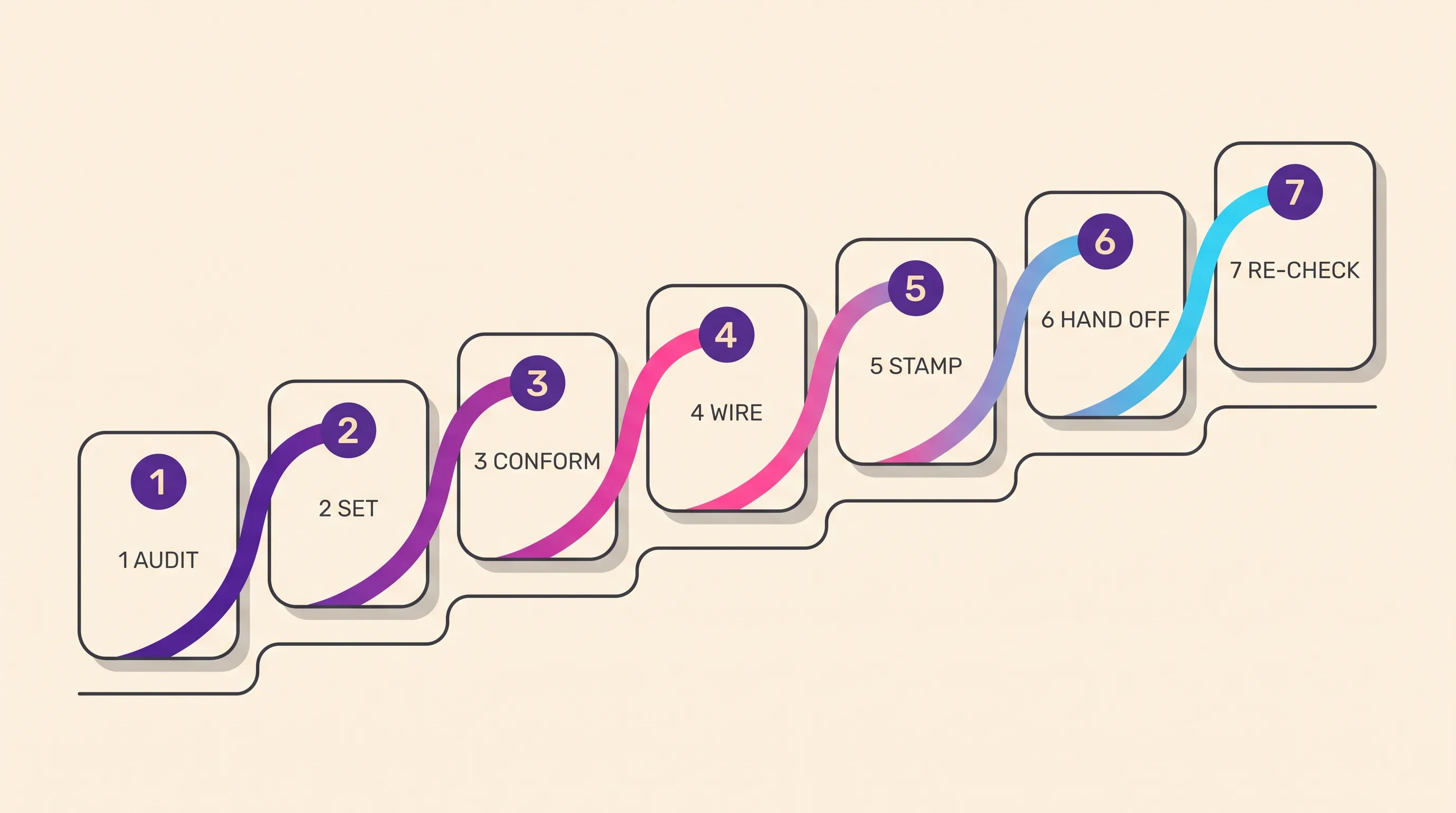
Conforming a master means re-cutting one finished ad per placement rather than shooting a new one, and it is seven steps: audit, set, conform, wire, stamp, hand off, re-check. This ladder assumes the ad already exists — for building it in the first place, follow the step-by-step AI video ad production workflow. Nothing below is a production step.
Audit which surfaces your catalog actually feeds
List every placement you are buying, then mark which ones render from a product feed and which render only from a creative file. Meta’s catalog placements pull video straight out of the catalog, with Allow product video on by default. TikTok’s Video Shopping Ads need no catalog and no pixel, because product data syncs from TikTok Shop. That split decides how much of the job is creative and how much is data hygiene.
Set the master spec to the strictest surface, not the biggest one
Set the master to the placement with the tightest constraint, not the one carrying the biggest budget. Amazon’s Sponsored Products spec strips audio entirely — the page states audio will be removed — and lists “caption on screen” among low-quality practices to avoid, while TikTok’s ad-format policy states “The ad must contain audio”. Conforming down from a strict master is a crop; conforming up from a loose one is a reshoot.
Conform safe zones and caption burn-in per surface
Re-cut the master once per placement for ratio, duration and safe area, then re-place burned-in captions and product callouts inside each surface’s clear region. TikTok publishes downloadable templates rather than fixed margins, with separate files for In-Feed and In-Feed with Anchor. Our free safe-zone checker runs in the browser with no signup.
Wire the product data the surface reads before you upload creative
Fix titles, prices, availability and image links before any creative goes anywhere, because on catalog-driven placements the feed decides which SKU renders in which slot. Meta’s catalog requires nine fields and a minimum 500 × 500 pixel image link. Google Merchant Center sets the same 500 × 500 floor, caps files at 16MB and 64 megapixels, and asks you to update the source on a schedule.
Stamp provenance on every generated file before it enters a feed
Write the IPTC DigitalSourceType tag onto every AI-made image before it reaches a feed. Merchant Center accepts three values — TrainedAlgorithmicMedia, CompositeSynthetic and AlgorithmicMedia — and instructs merchants not to remove the tag. Playcut does not write it today; Google names its own Product Studio as an example of a tool whose embedded tag must not be stripped, and publishes no separate fee for it inside Merchant Center.
Hand the algorithm every asset slot it rotates
Fill each placement’s full complement of slots rather than the minimum that passes validation. A Performance Max asset group takes 3 to 15 headlines, 2 to 5 descriptions, four or more horizontal and square images and two or more vertical, and Google recommends at least three videos of each orientation.
TikTok recommends 3 to 5 creatives per ad group, and a Meta catalog holds up to 20 videos per product at 200MB each.
Re-check the conform when the surface changes its spec
Re-run the ratio and safe-zone check against each platform’s current documentation before every new flight. Specs move without notice and two pages from the same platform can disagree: Amazon’s ad-specs page and its Sponsored Brands getting-started guide gave different aspect ratios on 21 August 2026. Google’s AI-label setting rolled out through July 2026. Re-conform the master rather than patching individual exports.
What an AI pipeline cannot make for any commerce surface
Six things sit outside what any generation pipeline can produce, and every one of them is load-bearing on a commerce surface: the product feed, the eligibility or brand gate, on-pack copy and label legibility, the price-and-inventory truth, provenance metadata, and the actual unit — its real stitching, seam, weld, label print and colour batch.
Two of those are hard gates rather than quality problems. Amazon Sponsored Brands requires Brand Registry enrolment before you can run the placement at all, and no video fixes an unenrolled brand. Provenance is the other: Google Merchant Center requires IPTC DigitalSourceType on AI-made images, Playcut writes none, and Google’s Product Studio sits inside Merchant Center — a product merchants already have — with no separate fee published for it.
The pattern underneath is consistent: AI is excellent at everything around the product — the person, the room, the light, the fifty variants, the ten languages — and unreliable at the product itself. The winning ecommerce pipeline is a real product plate composited into an AI world, not an AI product in an AI world. For the demonstration beat, a phone and five minutes still beats every generative model, ours included.
Returns are the standing cost of getting that wrong. NRF and Happy Returns forecast $849.9 billion in returned merchandise for 2025, 15.8% of annual sales and 19.3% of online sales — and no primary source apportions any share of that to inaccurate imagery, so this page puts no denominator on it.
None of this is fixed by a disclosure label, which answers a transparency obligation and does nothing for a substantiation obligation.
The ASA upheld a complaint brought by 22 complainants against UAB CommerceCore, trading as WiggyDog, on 25 March 2026 over a Meta ad for a robot-dog toy, finding the advertiser “provided no evidence regarding the functionality and appearance of the toy”. CAP’s June 2026 guidance is blunter: “Automated campaigns don’t remove responsibility.”
Safe zones, first frames, and caption burn-in
The same 9:16 master is cropped and overlaid differently by every placement, which is why AI video ads for ecommerce so often ship with the price or the call to action buried under interface chrome. Every commerce surface renders its own furniture over your frame — captions, a shop card, an action rail, a mute toggle — and none of it is in your export.
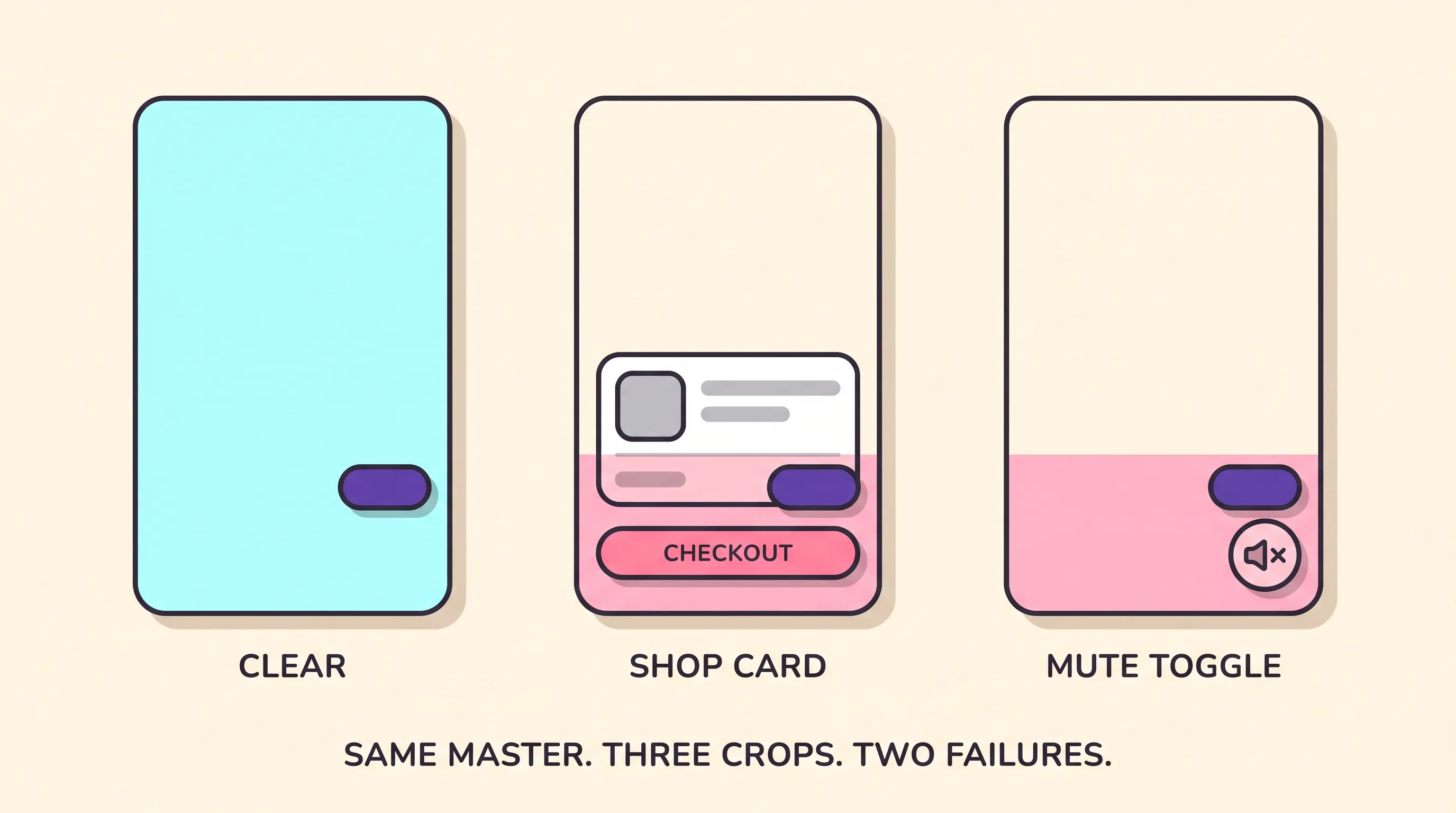
TikTok deliberately publishes no fixed pixel margins. Its templates come as separate downloadable files for In-Feed and In-Feed with Anchor, with separate Arabic right-to-left versions, because the safe area moves with the caption length and the add-ons on the ad. There is no single number to memorise, and that is the answer.
Amazon publishes a corner instead of a margin: keep text and other important information out of the lower right, where its mute toggle sits. Meta crops for you unless you stop it — its standard-enhancements bundle includes video auto-crop, and 4:5 and 9:16 placements are enabled by default. Work out the conform ratio before you cut.
The first frame is the only frame you fully control
The first frame is the only frame you fully control, because it renders before autoplay, before sound and before any caption expands. Amazon’s Sponsored Brands video starts playing when 50% of its pixels are on screen and, by default, always starts without audio, so the opening image carries the whole proposition. TikTok’s creative guidance puts the proposition in the first 3 seconds and the hook in the first 6.
Build that frame so it works with the type stripped off. Amazon lists on-screen captions among the low-quality practices to avoid for Sponsored Products video, and its Sponsored Brands specs tell advertisers to wait until later in the video to include the brand name and logo. TikTok caps on-screen text at 5 to 10 words per second and renders ad captions in a white font you cannot customise. The product has to read without help.
What this costs, in one paragraph
Conforming is cheap; the media is not, and this page is not the place for the arithmetic. Playcut plans start at $9/mo on Hobby, with Pro at $29/mo, and the current plan ladder carries the rest. The full production stack, from cost per clip through to cost per finished ad, lives in what an AI video ad actually costs to produce in 2026.
One measured figure, with its caveat attached: in a run of three product stills on 11 June 2026, Playcut produced 3 of 3 usable assets on the first take, at a 20.5-second mean per still and $0.97 per usable asset at Pro rates. That is n=3, on stills, not a benchmark.
Frequently asked questions
Can AI make ads for TikTok Shop?
Yes, and TikTok Shop publishes the conditions. Its seller policy on AI-generated content, effective 31 July 2026 in the United States, permits AI but requires a label whenever a video is fully AI-generated or carries synthetic faces, voices or digital humans, and it bans AI that alters a product’s size, colour, material or shape. Its video-quality rules also cap still-frame content at half the screen, so a slideshow ad is the wrong format for this surface.
How do you make AI ads for a Shopify store?
Treat Shopify as the catalog source rather than the ad surface. The store supplies the product data that Meta and Google read when they assemble catalog creative, and no generation pipeline can produce that layer for you. The ad itself gets built to the target placement’s spec, exported at that spec, and uploaded by a person. On-store product-page video is a different job with different rules.
Can AI ads run on Amazon?
Yes, on the paid retail-media side, inside a tight creative spec. Amazon’s Sponsored Brands video ad specs call for 16:9 square-pixel video, 6 to 45 seconds with 20 seconds or less highly recommended, under 500MB, autoplaying muted once half the pixels are on screen. Sponsored Products video goes further and removes audio entirely while discouraging on-screen captions and talking-head formats. The organic listing is a separate moderation system with separate answers.
Can AI generate the product feed that Advantage+ and Performance Max read?
No. A generation pipeline produces video and stills, not your catalog. Titles, prices, availability, identifiers and image links come from your store’s feed, and on catalog-driven placements the feed decides which SKU renders in which slot, so strong creative against a broken feed delivers nothing. Google Merchant Center also requires IPTC DigitalSourceType metadata on AI-generated feed images and forbids removing it.
What aspect ratio should an ecommerce AI ad be?
There is no single answer, and that is the finding. Performance Max asks for all three orientations at once: 1.91:1, 1:1 and 4:5 images plus 16:9, 1:1 and 9:16 video, each ten seconds or longer. TikTok recommends 9:16 at 540 by 960 pixels or larger, while Amazon’s Sponsored Brands ad-spec page says 16:9 square pixel only. Build the master at the strictest surface and conform down.
Do I need a different AI ad for every ecommerce surface, or can one master cover them all?
One master cannot cover them all, and the platforms’ own documentation is why. TikTok’s ad-format policy states the ad must contain audio; Amazon Sponsored Products states audio will be removed. The published specs cluster into two masters rather than one or five: a vertical presenter cut with sound and burned-in captions, and a silent product-forward horizontal cut. Each still gets conformed per placement for ratio, duration and safe zone.
Why do AI-generated ecommerce ads get cropped wrong?
Because the master was designed for a canvas instead of a placement. Every commerce surface renders its own interface over your frame, and a price or call to action sitting under that chrome disappears at delivery. Amazon tells advertisers to keep text out of the lower-right corner, where its mute control sits. TikTok publishes safe-zone templates rather than fixed margins, because the safe area shifts with caption length and interactive add-ons.
Which ecommerce ad surface gets the most out of AI creative?
Meta Advantage+ and catalog placements, because there the creative file is the whole ad. Meta’s catalog accepts up to twenty videos per product at 200MB each with no length restriction, and its allow-product-video setting is on by default. TikTok Shop comes second on native vertical volume. Performance Max and Amazon retail media rank lower for AI leverage because a feed or a live listing, not your video, decides what renders.
Pick the surface first, then build the ad
Pick the surface first, then build the ad. Read the placement’s own documentation for ratio, duration, audio rule and safe zone; build the master to the strictest of them; conform once per placement; wire the feed the surface reads; stamp provenance before the file enters a catalog; fill every slot the algorithm rotates; re-check when the spec moves.
The one thing to do next is smaller than a campaign. Take the single best-selling SKU you already advertise, open the spec page for the one placement it earns the most on, and re-conform your existing master to it. If the price pill moves out from under the chrome, that is the whole playbook in one SKU.
For the format layer underneath all five surfaces, start at the complete guide to AI video ads and the seven formats. For the same-SKU-every-variant problem, see the AI product ad generator that locks the same SKU in every variant; for creator-style vertical cuts, the AI UGC ad generator that ships 9:16 variants from one actor. Start conforming at app.playcut.ai.